How to use an iPhone as a watch timegrapher
A phone can hear a mechanical escapement and turn its rhythm into useful timing evidence. The result depends as much on setup and repetition as it does on the number on screen.
A watch timegrapher listens to the alternating tick and tock of a mechanical movement. From their timing it estimates rate, beat error, beat rate, and — with more assumptions — balance amplitude. An iPhone already has a microphone and a precise clock, so a careful app can perform this analysis without extra hardware.
The honest limit: a phone microphone is not a calibrated contact sensor. It is useful for checks and comparisons, but it does not replace a bench timegrapher or a watchmaker's diagnosis.
Set up the watch for a clean reading
- Wind the watch. A movement near the end of its power reserve can produce a different, less stable result. Give it a full wind and let it settle for a minute.
- Lay the iPhone flat. Use a hard surface such as wood or stone. Fabric and cushions absorb the quiet escapement sound.
- Put the watch beside the phone. Place it near the bottom microphone, roughly 5 cm away, with the crown toward the phone. Do not put the watch on top of the handset.
- Quiet the room. Speech, handling noise, and another ticking clock can interfere. Start the measurement, then leave the phone and watch untouched.
- Wait for a stable result. A fast lock is convenient, but a longer clean run gives the estimator more evidence.
If the app still cannot hear or lock onto the escapement, match its message to the exact fix in the iPhone timegrapher signal troubleshooting guide.
Understand the four main readings
The summaries below define the metrics. The companion guide to reading a timegrapher shows the safer interpretation order and explains conventional timing traces.
Still choosing a tool? The free online timegrapher vs iPhone app guide explains what changes between browser microphone capture, a native audio session, and a dedicated contact pickup.
Rate, in seconds per day
Rate estimates how much time the watch would gain or lose over a day if the measured behavior continued. Position, wind state, temperature, and movement condition can all change it. Treat one reading as a sample, not a permanent property of the watch.
Beat error, in milliseconds
Beat error describes the asymmetry between tick and tock. A phone app derives it from the acoustic signature of the escapement. Movement design and signal quality matter, so use it for comparison and investigation rather than as a standalone service verdict.
Amplitude, in degrees
Amplitude estimates how far the balance swings. Acoustic amplitude depends on how the app identifies events inside each escapement sound and on the assumed lift angle. Hairspring shows a live range because the microphone method supports several defensible answers rather than one perfectly exact degree value.
Beat rate, in beats per hour
Beat rate, or BPH, is the movement's nominal cadence. Common mechanical movements run from 14,400 to 36,000 BPH. Hairspring detects supported rates from the sound instead of requiring you to know the caliber first.
The most important step: measure again
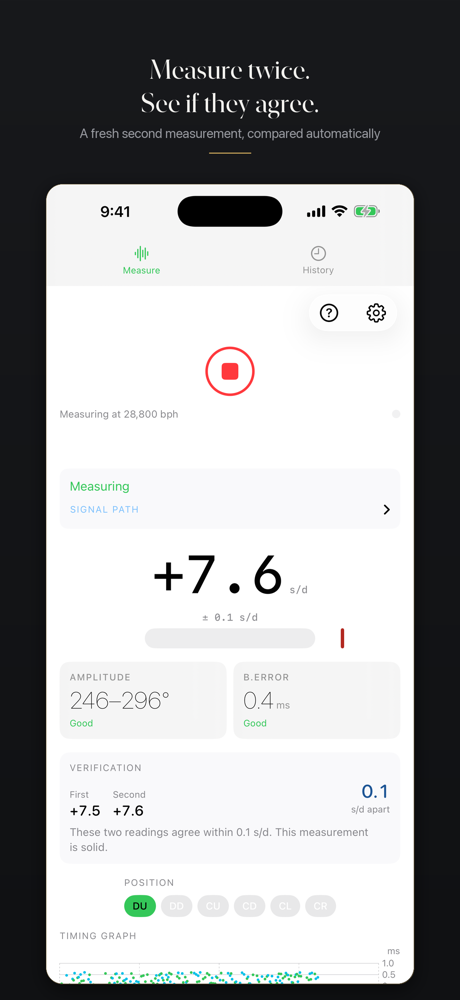
Finish one clean run, leave the setup unchanged, and repeat it. If two rates disagree by more than their uncertainty supports, the precise-looking digits in either run deserve less trust. Repetition catches placement changes, noise, and unstable detection that a single measurement can hide. The companion guide explains why timegrapher readings change and how Hairspring tests agreement.
Compare watch positions deliberately
A mechanical watch can run differently dial up, dial down, crown down, and in other positions. Measure one position at a time with the same wind state and similar run length. Position testing is more useful when you record the setup instead of chasing whichever single result looks best.
When to distrust or withhold a result
Do not act on a reading when the tick timing is scattered, the detected cadence is irregular, the rate is implausible, or repeated runs disagree. Improve placement and quiet the room first. If the result remains unstable, the right answer may be that the phone setup cannot support a measurement of that watch.
Try Hairspring on iPhone
Hairspring measures rate, beat error, and live amplitude; detects common beat rates; runs six-position sessions; saves local history; exports PDF measurement receipts; and explicitly withholds readings the signal cannot defend.

One $9.99 purchase. No subscription, account, ads, analytics, or automatic uploads.
Frequently asked questions
Can an iPhone work as a timegrapher?
Yes, for useful checks and comparisons when the mechanical watch is audible and the setup is quiet. It does not replace a calibrated bench instrument.
Where should I place the watch?
Beside the iPhone's bottom microphone on a hard surface, not on top of the phone. Move other ticking clocks away.
Why should I measure the watch twice?
Two readings reveal whether the result is repeatable under the same conditions. Agreement is stronger evidence than a single precise-looking number.